Ubuntu/Debian/Mint news and tutorials | Linux stuff
feed.png
Quick Tip #1
Disable Overlay Scrollbars in GNOME
For Ubuntu 12.10, open a terminal and type the following command:
gsettings set com.canonical.desktop.interface scrollbar-mode normal
Changes should occur instantly. The overlay scrollbars should now be replaced with normal scrollbars.

For Ubuntu 12.04, use the following command:
gsettings set org.gnome.desktop.interface ubuntu-overlay-scrollbars false
Log out and log back in for changes to occur.
Quick Tip #2
Mount an ISO Image from Command-Line
sudo mount -o loop /path/to/image.iso /path/to/empty/dir
Notice that /path/to/empty/dir must exist and should be empty.
Quick Tip #3
Find Out Current GNOME Version
For GNOME:
gnome-shell --version
For the Compiz window manager, use:
compiz --version

Exaile is a pretty decent music player for GNOME written in PyGTK which comes with features like tabbed playlists, lyrics fetching, radio support, file browser, support for dynamic and smart playlists, cover support, 10-band equalizer and more. The latest version was released a few days ago and comes with several bug fixes and minor issue fixes.

Exaile 0.3.2.1 running in Debian Squeeze

Full article

This article overviews five image viewers available for Ubuntu and also includes at the end a list of another five ones which either are no longer maintained or are based on older libraries (KDE3 for example).

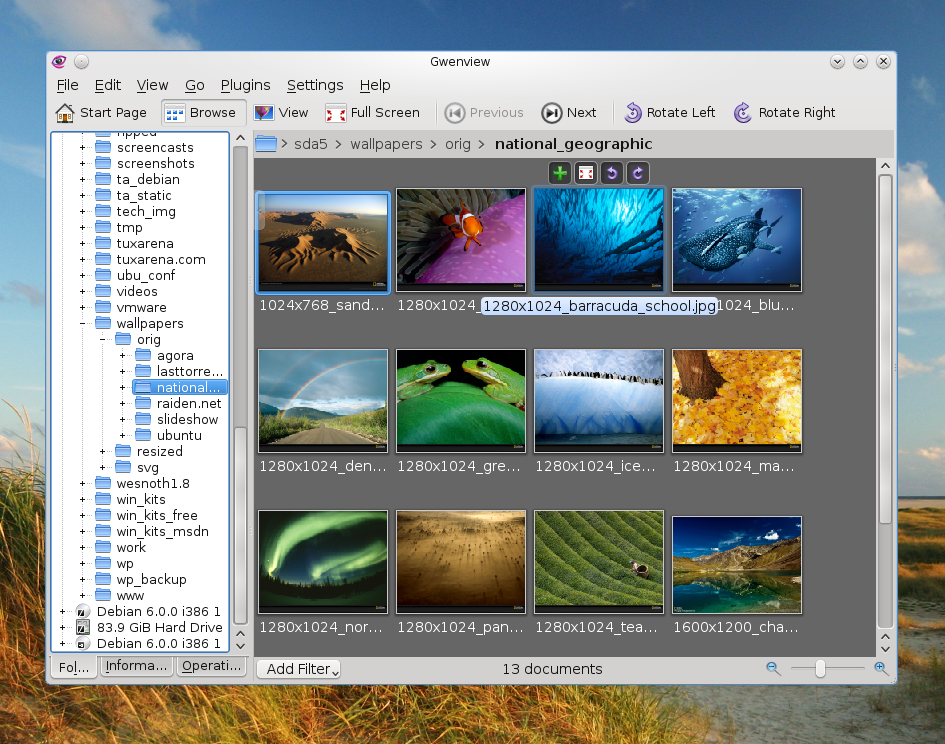
Gwenview
In my opinion this is probably the best image viewer available at the moment. Built for KDE4, Gwenview comes with support for virtually all image formats out there, tools to do basic editing, tree-like file browser, support for tags, thumbnail previews, cropping, image rating system, slideshow, fullscreen mode, support for plugins and two view modes (Browse and View).

sudo apt-get install gwenview

Full article

Sponsors
Advertise on TuxArena
Online Readers