
Ubuntu/Debian/Mint news and tutorials | Linux stuff
feed.png
Quick Tip #1
Disable Overlay Scrollbars in GNOME
For Ubuntu 12.10, open a terminal and type the following command:
gsettings set com.canonical.desktop.interface scrollbar-mode normal
Changes should occur instantly. The overlay scrollbars should now be replaced with normal scrollbars.

For Ubuntu 12.04, use the following command:
gsettings set org.gnome.desktop.interface ubuntu-overlay-scrollbars false
Log out and log back in for changes to occur.
Quick Tip #2
Mount an ISO Image from Command-Line
sudo mount -o loop /path/to/image.iso /path/to/empty/dir
Notice that /path/to/empty/dir must exist and should be empty.
Quick Tip #3
Find Out Current GNOME Version
For GNOME:
gnome-shell --version
For the Compiz window manager, use:
compiz --version

This is a quick, simple tip (but maybe no very obvious for the first time) for getting back the volume control tray icon in case you removed it by mistake.

The volume control tray icon is actually included in the “Indicator Applet”, together with the Internet connections and the chat/mail/messenger icons, rather than being available by itself. To add it back to the panel:

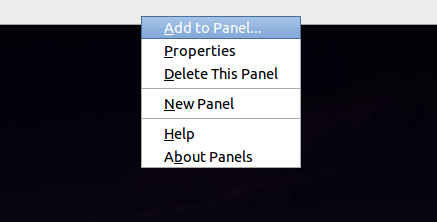
Right click on the panel, click Add to Panel…:

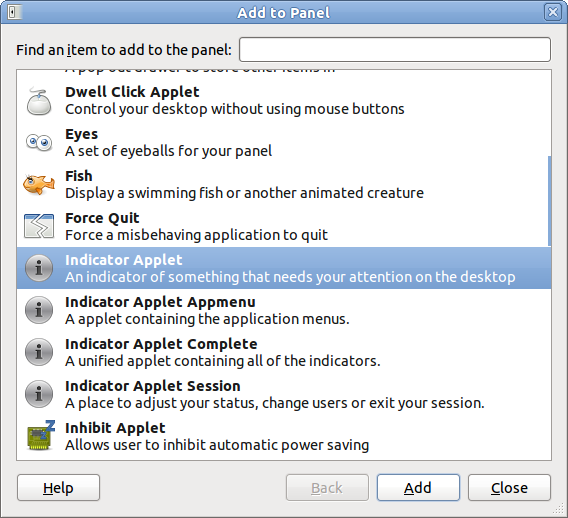
Now select Indicator Applet from the list and click the Add button.
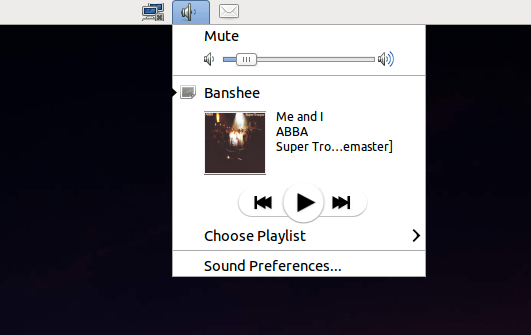
Here it is:
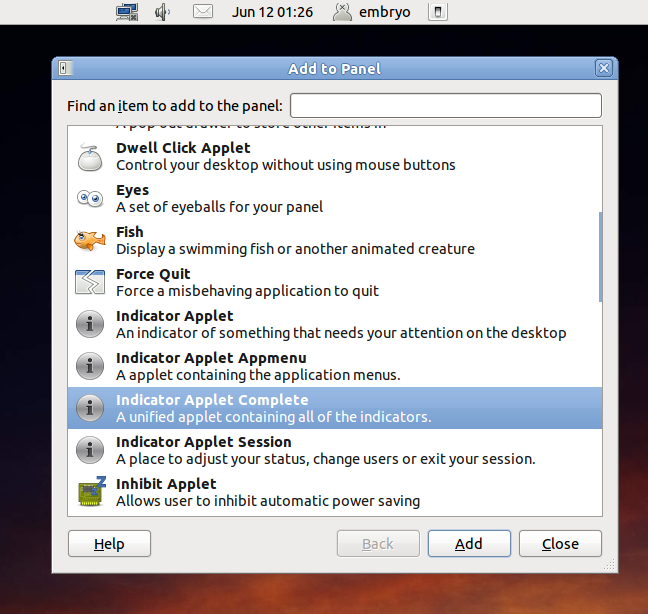
Notice that you can get all the default icons by adding the Indicator Applet Complete applet:
Wilfredo says:

Man, you are a life saver!! I was wondering WHY the volume control went away if I didn’t close it.

Thanks a Million!

Craciun Dan says:

Great to know it helped you!

Leave a Comment

Sponsors
Advertise on TuxArena
Online Readers